
CSRF Attack (Cross-Site Request Forgery)
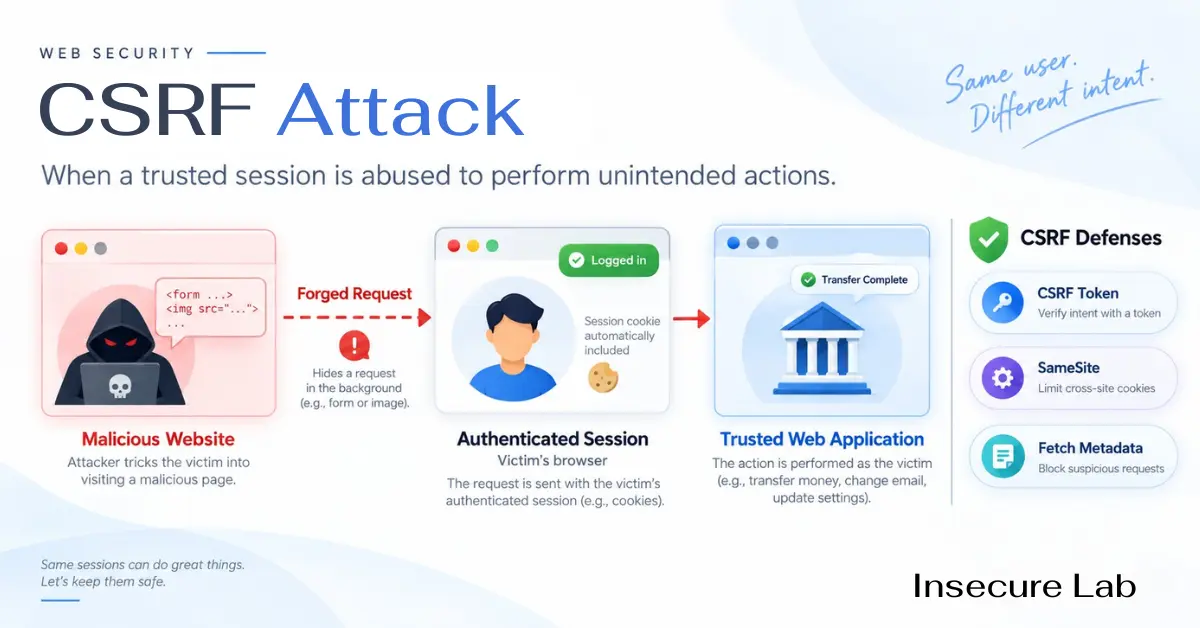
Table of Contents
Quick Answer
Cross-site request forgery (CSRF) makes a logged-in user's browser send a state-changing request the user never intended. It works because browsers attach session cookies to requests automatically, whichever site triggered them. The defence is to require something a foreign site cannot supply: a per-session CSRF token, a same-origin check using Fetch Metadata or the Origin header, and SameSite cookies as a backstop.
This defensive guide covers how CSRF works, how to tell it apart from the attacks it is confused with, and the controls current OWASP guidance recommends. Examples are conceptual.
What is CSRF?
CSRF is an attack on the trust a web application places in a user's browser. When you sign in to a site, it gives your browser a session cookie. From then on the browser sends that cookie with every request to that site, including requests started by a completely different site open in another tab. If the application accepts a request because the cookie is valid, and checks nothing else, another site can make your browser perform actions in your name.
The attack is also written XSRF and called sea-surf, session riding, or a one-click attack. MITRE catalogues it as CWE-352, and it ranks third in the 2025 CWE Top 25 Most Dangerous Software Weaknesses, up from fourth the year before.
CSRF had its own OWASP Top 10 entry until 2013 and was dropped as a standalone category in 2017, once mainstream frameworks shipped protection by default. It did not go away: OWASP maps CWE-352 under A01 Broken Access Control in the 2021 and 2025 editions, and it reappears wherever that default is switched off or bypassed.
How a CSRF Attack Works
Three conditions have to be true at the same time:
- A cookie-based session. The application identifies the user with a credential the browser attaches automatically: a session cookie, HTTP Basic authentication, or a client certificate.
- A state-changing action worth triggering. Changing an email address or password, transferring money, adding an administrator, changing a delivery address.
- No unpredictable value in the request. Every parameter the action needs can be guessed or is fixed, so the request can be built in advance by someone who cannot see the user's pages.
| Step | What happens |
|---|---|
| 1. User signs in | The trusted site sets a session cookie in the browser. |
| 2. User visits another page | While still signed in, the user opens a page the attacker controls or has planted content on, often from a link in an email or message. |
| 3. That page triggers a request | Hidden markup causes the browser to send a request to the trusted site, for example an auto-submitting form. |
| 4. The browser attaches the cookie | The request arrives with a valid session, so the trusted site cannot tell it from a genuine one and performs the action. |
Two details explain most of CSRF. The same-origin policy stops the attacker's page from reading the response, but not from sending the request, and for a state-changing action sending is enough. And the attacker never steals the cookie or learns the password: the victim's own browser does the work.
Types of CSRF
| Variant | How it arises | Why it matters |
|---|---|---|
| GET-based | An application changes state in response to a GET request. | The easiest case: any tag that loads a URL can trigger it. GET must never change state. |
| POST form-based | A cross-site form posts to the trusted site. | Using POST is not a defence on its own; browsers send cross-site form posts. |
| Login CSRF | The victim is silently signed in to the attacker's account. | Whatever the victim then enters, such as a card number or search history, is saved where the attacker can read it. Login forms need protection too. |
| JSON and API | An endpoint accepts a "simple" content type, or reads JSON from a form-encoded body. | Requiring application/json forces a CORS preflight, which a foreign site cannot pass without permission. |
| Client-side CSRF | The application's own JavaScript builds a request from attacker-influenced input such as a URL fragment. | The request comes from the trusted origin with a valid token, so server-side token checks do not catch it. Input handling in the client has to. |
CSRF vs XSS vs SSRF
These three are confused constantly because the names overlap. They abuse different trust relationships and need different fixes.
| CSRF | XSS | SSRF | |
|---|---|---|---|
| Whose trust is abused | The site's trust in the user's browser | The user's trust in the site | Internal systems' trust in the server |
| Where the attack runs | The victim's browser sends a request | Script runs inside the trusted page | The server sends a request |
| Can the attacker read the response? | No | Yes | Often |
| Primary defence | CSRF token, same-origin checks, SameSite | Output encoding, Content Security Policy | Destination allowlists, network egress controls |
One relationship matters in practice: XSS defeats CSRF protection. Script running inside the trusted page can read the CSRF token and send a perfectly valid request. CSRF defences assume the site is free of cross-site scripting. For the full comparisons, see XSS vs CSRF and SSRF vs CSRF.
CSRF vs Session Hijacking vs Session Fixation
All three involve a session cookie, which is why they turn up together in exam questions. The distinguishing question is: whose session is used, and who holds the cookie?
| Attack | What the attacker does | Does the attacker obtain the cookie? |
|---|---|---|
| CSRF | Makes the victim's browser send a request inside the victim's own session. | No. It never leaves the victim's browser. |
| Session hijacking | Steals a valid session identifier and uses it from their own machine. | Yes. Theft is the attack. |
| Session fixation | Forces the victim to use a session identifier the attacker already knows, then waits for them to sign in. | Yes. The attacker chose it in advance. |
CSRF Prevention
The principle behind every control is the same: require proof that the request came from your own application, using something a foreign site cannot forge or obtain.
1. Use your framework's built-in protection
This is OWASP's first recommendation, because hand-written defences are where mistakes happen. Spring Security enables CSRF protection by default for state-changing methods. Django ships CsrfViewMiddleware with the {% csrf_token %} template tag, Laravel has the @csrf directive, Rails has protect_from_forgery, and ASP.NET Core has antiforgery tokens. Angular's HttpClient reads an XSRF-TOKEN cookie and returns it as an X-XSRF-TOKEN header automatically. In code review, the usual CSRF finding is not a missing feature but a line that turned the default off.
2. Synchronizer token pattern
The server generates an unpredictable token tied to the user's session, embeds it in each form or exposes it to the page's JavaScript, and rejects any state-changing request that does not return it. A foreign site cannot read the token because of the same-origin policy, so it cannot build a valid request. Tokens belong in a hidden field or a request header, never in a URL, where they leak through logs, history and the Referer header.
3. Signed double-submit cookie
Stateless applications can send the token both as a cookie and as a request parameter and compare the two. OWASP now marks the naive version of this pattern as discouraged, because an attacker who can set a cookie, for example from a vulnerable subdomain, can supply a matching pair. The recommended form binds the token to the session with an HMAC using a server-side secret.
4. Fetch Metadata request headers
Modern browsers label every request with Sec-Fetch-Site, which tells the server whether the request came from the same origin, the same site, or a different site. Page script cannot set or alter this header. A short server-side policy rejects cross-site state changes outright:
if request.method not in ("GET", "HEAD", "OPTIONS"):
    site = request.headers.get("Sec-Fetch-Site")
    if site is not None and site not in ("same-origin", "none"):
        reject(403)   # cross-site or same-site state change
Requests without the header come from older browsers or non-browser clients, so allow them through to your token check rather than blocking them. Roll the policy out in logging mode first.
5. SameSite cookies
Set-Cookie: session=<id>; Secure; HttpOnly; SameSite=Lax; Path=/
SameSite=Strict withholds the cookie from all cross-site requests. SameSite=Lax withholds it from cross-site POSTs and subresource requests but still sends it on top-level GET navigations, which is one more reason GET must never change state. Set the attribute explicitly: Chromium-based browsers treat a cookie with no SameSite attribute as Lax, but browsers differ. Treat it as defence in depth rather than the whole answer, because "site" is broader than "origin". Every subdomain of your registrable domain is same-site, so one compromised or user-controlled subdomain sits inside the boundary.
6. Custom request headers for APIs
A cross-site HTML form cannot add custom headers, and cross-site JavaScript can only add them after a CORS preflight your server has to approve. Requiring a header such as X-CSRF-Token on every state-changing API call is therefore a cheap and effective control, provided the CORS policy does not allow arbitrary origins with credentials.
fetch("/api/profile", {
  method: "POST",
  credentials: "same-origin",
  headers: { "Content-Type": "application/json", "X-CSRF-Token": token },
  body: JSON.stringify(changes),
});
7. Supporting controls
- Keep GET, HEAD and OPTIONS free of side effects, so every state change goes through a protected method.
- Verify the
Originheader, falling back toReferer, against an allowlist of your own origins. - Require re-authentication or a one-time code for the highest-risk actions: password and email changes, payments, permission grants.
- Protect the login form as well, to prevent login CSRF.
- Fix cross-site scripting first. No CSRF control survives script running inside your own origin.
"CSRF Token Mismatch" and "Invalid CSRF Token" Errors
These errors mean the protection is working: the server received a state-changing request without the token it expected. Laravel reports it as 419 Page Expired, Spring Security as 403 Forbidden with an invalid CSRF token message, and Django as 403 CSRF verification failed. When genuine users hit it, the usual causes are:
- The session expired while the form was open, so the token it held is no longer valid.
- A cached copy of the page, from the browser, a CDN or a reverse proxy, carries someone else's or an old token. Pages containing tokens must not be cached publicly.
- The user signed in again in another tab, which issued a new token and invalidated the first tab's.
- An AJAX request was sent without the token header, often after a front-end change.
- The cookie holding the token was not sent because of its
Domain,Path,SecureorSameSitesettings, commonly after moving to a new subdomain or putting the app behind a proxy that terminates TLS.
The fix is to correct the cause. Disabling CSRF protection to make the error disappear reopens the vulnerability, and it is the change most likely to be flagged in a later security review.
Developer Review Questions
- Does any GET endpoint create, update or delete anything?
- Is CSRF protection disabled anywhere, and is that endpoint genuinely free of cookie authentication?
- Does the API accept both a bearer token and a session cookie? If so, the cookie path needs protection.
- Are session cookies set with an explicit
SameSitevalue, plusSecureandHttpOnly? - Can any subdomain be controlled by users or third parties, such as hosted content, a legacy app, or a dangling DNS record?
- Does the CORS policy reflect arbitrary origins while allowing credentials?
- Are login, logout and password-reset forms covered, not just the account pages?
- Are the tests for these controls run in an authorised development or QA environment?
FAQs
XSRF-TOKEN and X-XSRF-TOKEN.SameSite=Lax also still sends cookies on top-level GET navigations. Use it together with a CSRF token or Fetch Metadata checks.Authorization header that JavaScript adds explicitly is not exposed to classic CSRF, because the browser does not attach that header automatically. If the same API also accepts a session cookie, or stores its token in a cookie, it needs CSRF protection. See our API security guide for the wider picture.Sources and further reading
- OWASP - Cross Site Request Forgery (CSRF) — Attack definition and background
- OWASP Cheat Sheet Series - CSRF Prevention — Token patterns, Fetch Metadata, SameSite and login CSRF guidance
- MITRE CWE-352 - Cross-Site Request Forgery — Weakness definition and relationships
- MITRE - 2025 CWE Top 25 Most Dangerous Software Weaknesses — CSRF ranked third in the 2025 list
- OWASP Top 10:2025 - A01 Broken Access Control — CWE-352 is mapped under this category
- MDN Web Docs - Cross-site request forgery (CSRF) — Browser behaviour and defences
- MDN Web Docs - Set-Cookie and the SameSite attribute — SameSite values and cookie scoping
- web.dev - Protect your resources from web attacks with Fetch Metadata — Sec-Fetch-Site resource isolation policy
- Spring Security Reference - Cross Site Request Forgery (CSRF) — Framework default protection for servlet applications