
Intrusion Detection System (IDS)
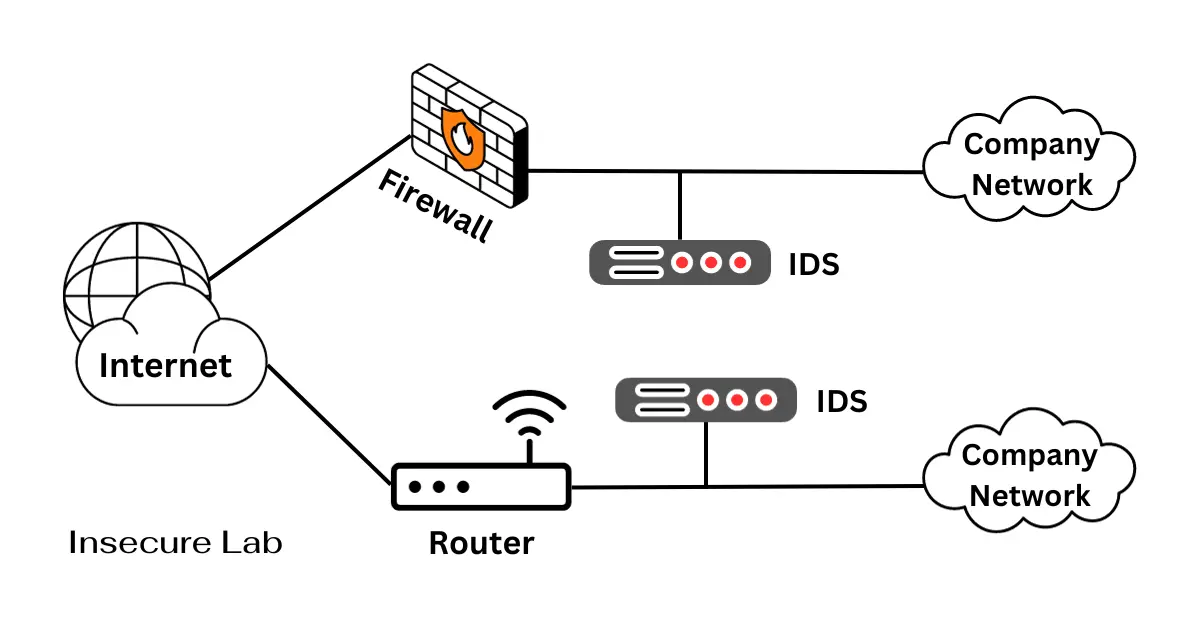
Table of Contents
Quick Answer
An intrusion detection system, or IDS, monitors network, host, log, or behavior data and raises alerts when it sees suspicious activity. IDS tools help defenders notice possible incidents, but they must be tuned, reviewed, and paired with response processes.
What is an Intrusion Detection System?
An IDS is a defensive monitoring technology that observes hosts, networks, logs, or application behavior for signs of suspicious activity. It may use signatures, anomaly detection, protocol analysis, or hybrid detection methods to raise alerts for investigation.
An IDS does not replace firewalls, endpoint protection, secure configuration, or incident response. It helps defenders see events that need attention and understand where to investigate next.
What Does IDS Stand For?
IDS stands for Intrusion Detection System. In cyber security, an IDS monitors network traffic, host activity, logs, or behavior patterns and raises alerts when it detects suspicious activity. It is most useful when alerts include enough context for analysts to review source, destination, asset, timestamp, and related events.
IDS Diagram: Where an Intrusion Detection System Fits
An IDS diagram helps beginners understand where monitoring data is collected and how alerts move into an investigation workflow.
| Location | What it watches | Useful for | Limitation |
|---|---|---|---|
| Network edge or internal segment | Packets and flows | Scans, suspicious connections, policy violations | May miss details inside encrypted traffic |
| Host or server | Files, processes, logs, and local events | Endpoint activity and suspicious changes | Limited to hosts where monitoring is installed |
| Cloud or SIEM workflow | Logs, events, alerts, and identity activity | Correlation and investigation | Depends on log quality and coverage |
Main IDS Components
- Sensor or agent: collects traffic, host, or log data.
- Detection engine: compares activity with signatures, rules, baselines, or behavior models.
- Rules and signatures: define known suspicious patterns or policy violations.
- Event storage: keeps alert details for review and correlation.
- Alert console: helps analysts triage and investigate signals.
- SIEM or response workflow: connects IDS alerts with logs, tickets, and incident response.
IDS vs IPS
| Control | Main Role | Example Use | Limitation |
|---|---|---|---|
| IDS | Detect and alert | Notify analysts about suspicious traffic or host activity | Does not automatically block by default |
| IPS | Detect and block inline | Drop selected known-bad traffic when confidence is high | Requires careful tuning to avoid disrupting legitimate traffic |
| Firewall | Enforce traffic rules | Allow or block by policy | May not understand all attack behavior or host context |
Network IDS vs Host IDS
A network IDS watches traffic at one or more network points. A host IDS watches activity on a specific system, such as file changes, process behavior, logs, or local events. Many environments use both so defenders can compare what happened on the network with what happened on the endpoint.
Signature-Based vs Anomaly-Based Detection
Signature-based detection looks for known patterns. Anomaly-based detection looks for behavior that differs from a baseline. Signatures are often precise for known issues, while anomaly detection may catch unusual behavior but usually needs tuning to reduce false positives.
How IDS Alerts Are Reviewed
A useful IDS alert should be reviewed with asset context, source and destination details, timestamps, related logs, known maintenance activity, and business impact. Analysts should tune noisy alerts, document response steps, and avoid treating every alert as confirmed compromise.
IDS Tuning Checklist
- Start with critical assets and high-value network paths.
- Enable alerts that map to realistic threats for the environment.
- Suppress or tune known false positives after review.
- Review alerts with firewall, DNS, endpoint, identity, and application logs.
- Document escalation steps for high-confidence alerts.
- Review detection coverage after major infrastructure or application changes.
Benefits and Limitations
- Benefits: earlier warning, better visibility, threat-informed monitoring, and investigation support.
- Limitations: false positives, blind spots in encrypted traffic, tuning requirements, and alert fatigue.
- Best practice: tune alerts, document response steps, and review detection coverage regularly.
Beginner Detection Examples
Beginner-friendly IDS examples include alerts for unusual outbound connections, repeated failed logins, suspicious ARP activity, malware beacon patterns, unexpected scanning, or traffic that may affect availability during a DoS incident. These should be studied in labs or authorized monitoring environments.
FAQs
Sources and further reading
- NIST SP 800-94 - Guide to Intrusion Detection and Prevention Systems — Primary IDS and IPS reference
- CISA Cybersecurity Alerts and Advisories — Operational alerting and detection context
- MITRE ATT&CK - Data Sources — Threat-informed telemetry and detection context