
Denial of Service (DoS) Attack
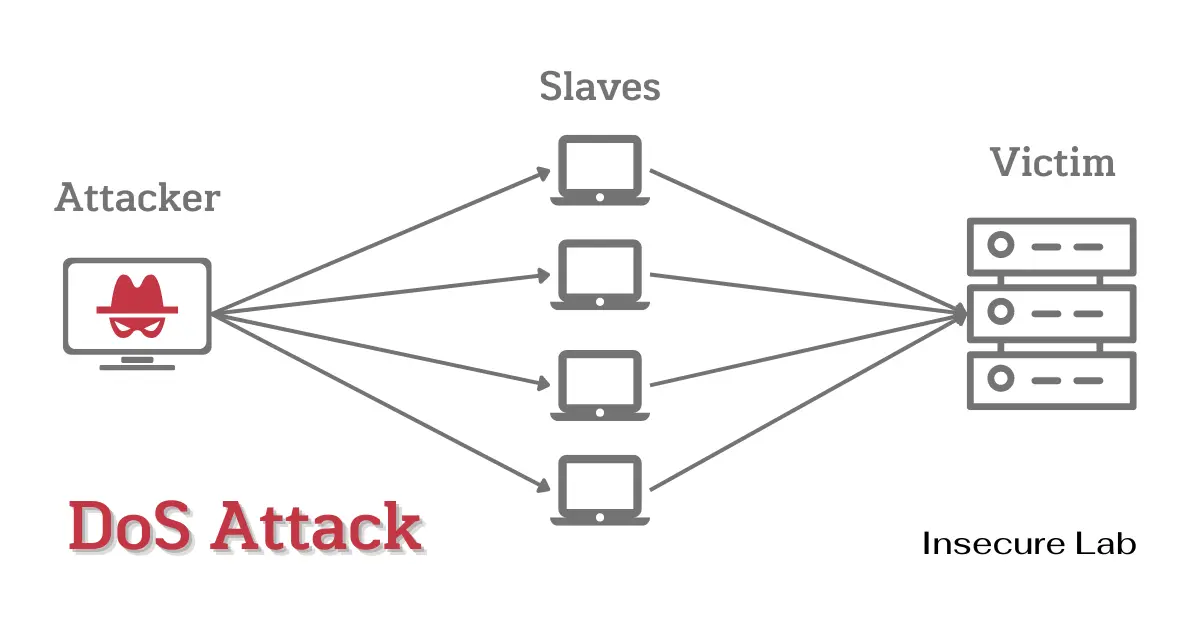
Table of Contents
Quick Answer
A DoS attack tries to make a website, server, application, or network unavailable to legitimate users. The primary goal is availability disruption by exhausting resources, triggering failures, or preventing normal requests from completing. Defenders reduce risk with monitoring, rate limits, filtering, capacity planning, intrusion detection, CDN or DDoS protection, and tested response plans.
This guide explains what a denial-of-service attack is, its primary goal, common DoS types, warning signs, DoS vs DDoS differences, simple diagram concepts, and practical defensive prevention and mitigation methods.
What is a DoS Attack?
A Denial of Service (DoS) attack is an attempt to disrupt the normal functioning of a targeted server, service, application, or network so legitimate users cannot access it reliably.
A DoS incident may happen because of excessive traffic, malformed requests, resource exhaustion, or weaknesses in how an application or network service handles load. Defensive teams should focus on identifying the affected resource and restoring availability safely.
Primary Goal of a DoS Attack
The primary goal of a DoS attack is to make a website, application, server, or network unavailable to legitimate users. Unlike data theft, the main impact is availability loss: slow responses, failed requests, service errors, unstable sessions, or complete downtime.
DoS Attack Diagram: Simple Traffic Flow
| Scenario | Simple flow | Result |
|---|---|---|
| Normal traffic | User requests → application or server → normal response | Legitimate users receive stable service |
| DoS condition | Excessive, abnormal, or malformed requests → overloaded resource → slow or failed responses | Legitimate users experience degraded or unavailable service |
A DoS diagram is useful for beginners because it shows the availability problem without needing attack instructions. The important defensive question is: which resource becomes exhausted first—bandwidth, CPU, memory, connection slots, application workers, database connections, or a third-party dependency?
DoS vs DDoS Attack
A DoS attack usually comes from one source or a small set of sources, while a DDoS attack uses many distributed systems to overwhelm a target. Both can affect availability, but DDoS attacks are harder to filter because traffic may come from many networks at once.
Signs of a DoS Attack
- Sudden traffic spikes that do not match normal usage patterns.
- Slow response times, connection timeouts, or frequent service errors.
- Unusual traffic patterns by URL, region, protocol, user agent, or source network.
- High CPU, memory, bandwidth, connection, or database-resource usage.
- Errors concentrated on one service, endpoint, region, or provider.
What Defenders Should Check First
- Is the issue limited to one endpoint, service, region, or provider?
- Are bandwidth, CPU, memory, connection pools, or database limits exhausted?
- Are errors concentrated by URL, protocol, user agent, source network, or geography?
- Are CDN, WAF, firewall, load balancer, and application logs available?
- Is this traffic spike legitimate, malicious, misconfigured automation, or a dependency failure?
Types of DoS Attacks
DoS attacks are commonly grouped by the resource they affect. This section is intentionally high-level and defensive; it helps beginners recognize availability risks without providing disruption workflows.
| Type | What it affects | Defensive focus |
|---|---|---|
| Ping of Death | Historically vulnerable packet handling | Patch systems and monitor abnormal network errors |
| Teardrop | Historically vulnerable packet reassembly | Keep systems updated and detect malformed traffic patterns |
| SYN flood | Connection handling and server state | Use SYN protections, rate limits, and upstream filtering |
| UDP or ICMP flood | Bandwidth and packet processing capacity | Filter unnecessary protocols and use network-layer protection |
| HTTP flood | Application workers, sessions, and backend dependencies | Use caching, rate limits, bot controls, and application monitoring |
| Slow request patterns | Connection slots and application threads | Apply timeouts, connection limits, and server hardening |
How Malicious Traffic Affects Network Connectivity
DoS attacks affect network connectivity by consuming bandwidth, connection tables, CPU, memory, application threads, or backend database resources. Even when the server is not fully offline, legitimate users may experience slow pages, failed requests, timeout errors, or unstable sessions.
Defensive teams usually combine traffic filtering, rate limiting, CDN protection, DDoS protection, monitoring, deception signals, and incident-response playbooks to reduce impact.
Prevention and Mitigation
Preventing DoS impact requires a multi-layered approach that includes both technical and procedural measures.
- Capacity planning: understand normal traffic, peak loads, and the first resource likely to fail.
- Rate limiting and traffic shaping: limit abusive request patterns without blocking legitimate users.
- CDN and DDoS protection: absorb and filter unwanted traffic before it reaches origin infrastructure.
- Firewalls and ACLs: restrict unnecessary exposure and enforce known-good traffic paths.
- IDS/IPS and monitoring: use IDS, logs, and alerts to identify abnormal availability events.
- Load balancing and graceful degradation: reduce single points of failure and preserve critical functions.
- Patch management: keep operating systems, network devices, servers, and frameworks updated.
- Incident response: define who contacts hosting, CDN, ISP, cloud, and communication teams during an outage.
DoS Response Checklist
- Identify the affected service and business impact.
- Contact hosting, CDN, ISP, cloud, or DDoS protection providers early.
- Apply safe rate limits and filtering rules.
- Preserve logs for analysis.
- Communicate status internally and externally if needed.
- Review what failed after the incident.
- Test response steps before the next incident.
Summary
DoS attacks threaten service availability. Beginners should understand the primary goal, common resource-exhaustion patterns, warning signs, and defensive controls. Organizations reduce impact with resilient architecture, monitoring, filtering, rate limits, provider coordination, and tested response plans.
FAQs
Sources and further reading
- NIST Glossary - Denial of Service — Stable definition of denial-of-service attacks
- NIST Glossary - Distributed Denial of Service — Stable definition of distributed denial-of-service attacks
- CISA - Understanding and Responding to Distributed Denial-of-Service Attacks — DoS and DDoS awareness guidance
- OWASP - Denial of Service — Application-level denial-of-service overview
- NCSC - Denial of Service Guidance — DoS preparation, response planning, and mitigation guidance
- Cloudflare Learning Center - DDoS Attack — DDoS concepts and mitigation background