
Table of Contents
This step-by-step guide explains image steganography with S-Tools and shows how data can be hidden and extracted from images for responsible educational use.
S-Tools is a legacy steganography learning tool. Use it only in a controlled lab with your own files, and do not use steganography to hide illegal, harmful, or unauthorized content.
Introduction to S-Tools
S-Tools is a versatile and powerful steganography tool used for concealing information within digital files, primarily images and audio files.
Steganography is the practice of hiding one piece of data (the hidden message) within another (the carrier) in such a way that it is difficult to detect.
S-Tools achieves this by subtly altering the least significant bits (LSBs) of the carrier file to embed the hidden data without noticeably affecting the visual or audible quality of the carrier.
S-Tools primarily supports image formats like JPEG, BMP, and GIF, as well as audio formats like WAV.
In this comprehensive guide, we will delve into the various aspects of S-Tools, including its features, usage, and ethical considerations.
What is Image Steganography?
Image steganography is a technique used to hide secret information or messages within digital images without visibly altering the image’s appearance. It allows for covert communication and can be used for various purposes such as secure data transfer or encryption.
The most common method in image steganography is altering the least significant bits (LSBs) of the pixel values. By making subtle changes to these least significant bits, the hidden data is incorporated into the image.
Image Steganography with S-Tools
S-Tools is a steganography tool developed by Andy Brown. S-Tools conceals the secret message inside the cover file through random accessible bits. You can use BMP, GIF, and WAV file types to cover documents that hide secret data.
Below are the steps to help clarify the concept of image steganography using S-Tools:
1. The original legacy S-Tools download is no longer hosted here. This article is kept for historical and educational context. Use modern, trusted, actively maintained steganography tools from their official sources and scan any downloaded software before use.
2. Prepare the secret file that you want to hide (New text document.txt)
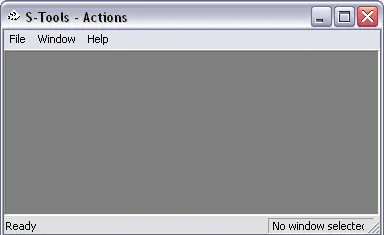
3. Launch the steganography tool (S-Tools.exe)
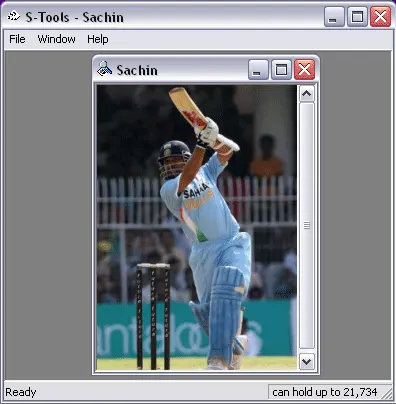
4. Drag and drop the host file (Sachin.bmp) inside which you want to hide your secret file.
5. Now, Drag and drop the secret file (New text document.txt) over the host file (Sachin.bmp). As soon as you drop the secret file you will be alerted by s-tools to enter password and to choose encryption algorithm which can be further used to retrieve your secret file from the host file.
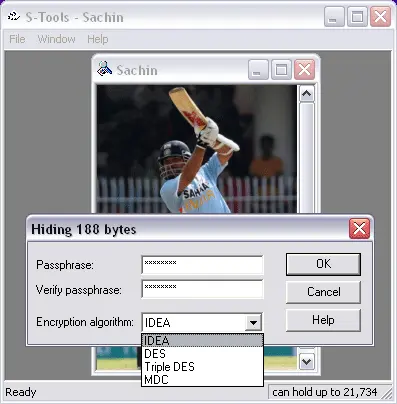
6. After entering password and encryption algorithm, click OK, the steganography tool will then create an identical copy of the host file (hidden data.bmp) as shown below.

This identical copy actually consist of hidden data (your secret file), but it can never be differentiated from original one by human eyes.
7. The duplicate file containing hidden data can be saved by right clicking and selecting ‘save as’ option.
8. To reveal the hidden data from duplicate file (hidden data.bmp), open the file in steganography tool. Then right click and select ‘reveal’ option; you will be promted to enter password and proper encryption algorithm. As soon as you click OK you will be offered by ‘reveal archive’ as shown below:
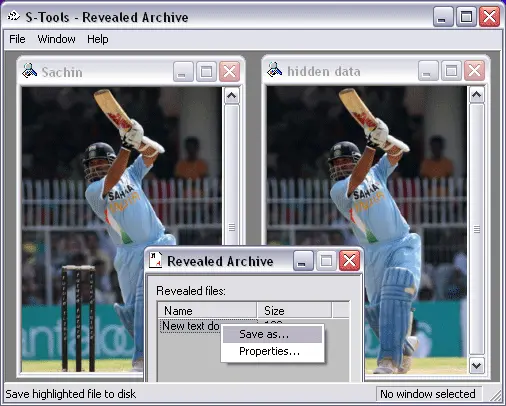
This consist of exact secret file (New text document.txt). Then, you can save it to read the secret information.
Key Takeaways
1. Image steganography hides data inside an image while keeping the visible image mostly unchanged.
2. S-Tools can hide and extract data from supported image and audio files for legitimate learning use cases.
3. Hidden data generally requires the correct tool, password, and settings to extract successfully.
4. Steganography should be used only for authorized, educational, privacy, copyright, or defensive purposes.
FAQs
What is image steganography?
What is S-Tools used for?
Can hidden data be extracted from an image?
Is image steganography legal?
What file types does S-Tools support?
Does S-Tools still work on modern Windows?
Summary
You can use S-Tools to hide private or confidential information that you don’t want to fall into the wrong hands. Alternatively you can use S-Tools to verify your copyright of an image or sound, by storing an encrypted copyright statement in it and extracting it in case of a dispute.
Steganography can be a powerful tool for protecting and hiding data when used responsibly and ethically. Always consider the legal and ethical implications before employing steganography techniques. S-Tools, with its user-friendly interface and various features, can be a valuable asset for those seeking to utilize steganography for legitimate purposes.