
Honeypot in Cybersecurity
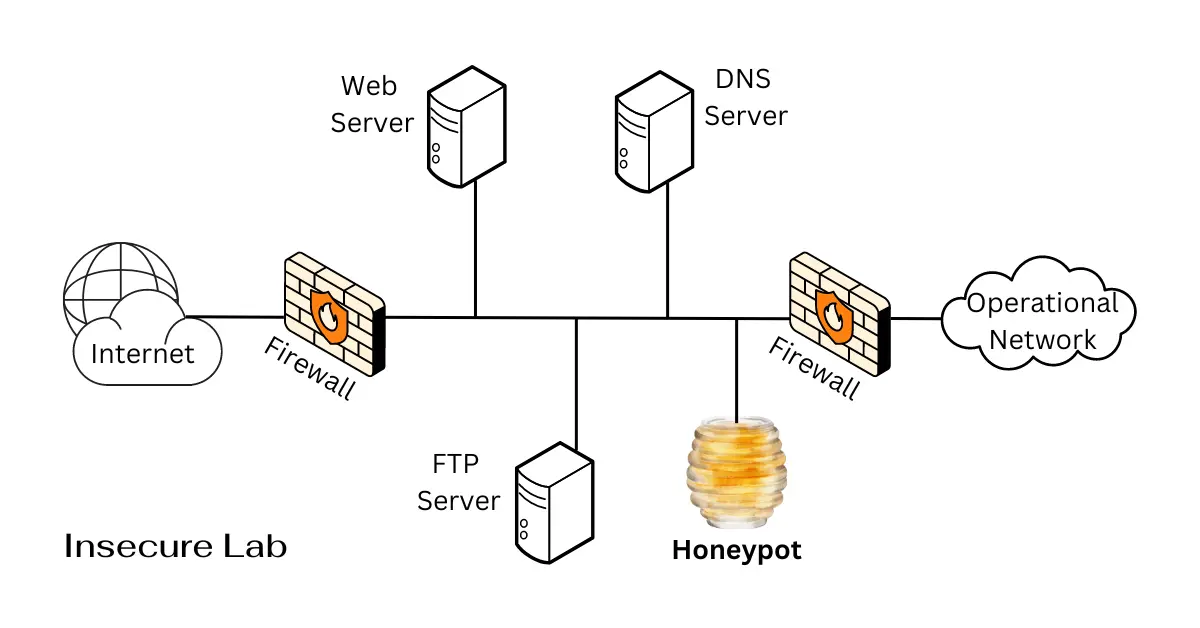
Table of Contents
Quick Answer
A honeypot in cybersecurity is a defensive decoy system, service, account, or file used to attract and observe suspicious activity. It can support detection and research, but it must be isolated, monitored, and never connected casually to production systems.
What is a Honeypot?
In cybersecurity, a honeypot is a system, service, account, file, or application intentionally designed to look interesting while being separate from production assets. Because legitimate users usually have no reason to interact with it, activity can be a useful signal.
Why Defenders Use Honeypots
- Detect suspicious scanning or login attempts.
- Collect intelligence about attacker behavior.
- Study malware or automated abuse in controlled settings.
- Create high-signal alerts with lower normal-user noise.
Is a Honeypot an Attack?
The phrase "honeypot attack" is searched often and usually means one of three different things. Separating them matters, because only one of the three is something a defender deploys.
| What people mean | Who is acting | Reality |
|---|---|---|
| Attacks observed against a honeypot | Attacker probes the decoy | The normal, intended case. The honeypot is a sensor, not a weapon. |
| A honeypot used as a launch point | Attacker pivots out of a poorly isolated decoy | A deployment failure. This is the main operational risk of high-interaction honeypots. |
| A fake service used to lure victims | Attacker runs the decoy | Not a honeypot in the defensive sense. A malicious lure such as a rogue access point or fake login portal. |
A defensive honeypot does not attack anyone. It holds no production data and offers no service anybody legitimately needs, which is precisely why interaction with it carries signal. The risk to manage is the second row: if a decoy is not isolated properly, an attacker who compromises it may use it to reach real systems, and the organisation running it may carry responsibility for that traffic.
What is a Honeypot Server?
A honeypot server is simply a honeypot deployed as a full server rather than a single emulated service or file. It typically runs a real or simulated operating system with services that look reachable, and it sits on a network segment that has no legitimate reason to receive traffic.
- Placement. Usually in an isolated segment or DMZ where it cannot initiate connections into production.
- Data. Populated with realistic but fabricated content, never copies of real customer or business records.
- Monitoring. Logged externally, so an attacker who gains access cannot simply erase the record of what they did.
- Lifecycle. Rebuilt from a known-good image after any interaction, rather than cleaned in place.
The distinction between a honeypot server and a honeytoken is scale. A honeytoken might be one fake credential or document that raises an alert when used. A honeypot server is an entire machine whose only purpose is to be interacted with by someone who should not be there.
Honeypot Examples in Practice
Honeypots are easier to understand through the shape they take in a real environment than through definitions alone. These are the forms defenders most often deploy.
| Example | What it looks like | What its alerts usually mean |
|---|---|---|
| Decoy SSH or RDP service | A remote-access port open on an unused address | Automated credential guessing, or someone mapping the network |
| Fake admin login page | A convincing but non-functional web portal | Targeted probing rather than generic scanning |
| Honeytoken credential | A fake username and password left in a config file or password vault | Someone has read a location they should not have reached |
| Canary document | A file that phones home when opened | Data has left its intended location |
| Decoy database record | A fabricated customer entry among real ones | The record surfacing elsewhere indicates a data leak |
| Spam trap address | An email address never used publicly | Address harvesting, or a list has been sold or breached |
The honeytoken and canary document examples deserve particular attention because they are inexpensive. They require no separate server, no isolated segment, and very little maintenance, yet they produce some of the highest-confidence alerts available to a small team. A fake credential that nobody legitimate knows about cannot generate a false positive in the way a network sensor can.
Legal and Ethical Considerations
Honeypots sit closer to legal grey areas than most defensive controls, because they involve deliberately inviting interaction and then recording it. The specifics vary by jurisdiction, and this is general educational information rather than legal advice, but several themes recur.
- Recording and privacy. A honeypot captures the activity of whoever interacts with it. Where that capture includes personal data or communications content, data-protection and interception rules may apply even though the person was uninvited.
- Entrapment concerns. Entrapment is generally a defence against prosecution by state actors, so it rarely applies to a private organisation. It is still worth avoiding designs that actively solicit wrongdoing rather than passively waiting for it.
- Downstream liability. If a poorly isolated honeypot is used to attack a third party, the operator may bear some responsibility for the resulting traffic. This is the strongest practical argument for strict egress controls.
- Scope and authorisation. Deploying a honeypot on infrastructure you do not own or control, including many cloud and hosting environments, may breach the provider's acceptable-use terms.
- Evidence handling. If honeypot data may later support a legal process, how it is collected, timestamped, and stored affects whether it is usable.
The practical conclusion for most teams is to involve legal or compliance review before deploying anything beyond a honeytoken, and to document the intent, scope, and data handling in advance rather than after an incident.
Types of Honeypots
Common types include low-interaction service emulators, high-interaction decoy systems, web application honeypots, spam traps, database decoys, credential honeytokens, and internal deception resources.
Low-Interaction vs High-Interaction Honeypots
| Type | Best For | Benefit | Limitation |
|---|---|---|---|
| Low-interaction | Basic scanning and automated attempts | Lower operational risk | Less realistic behavior |
| High-interaction | Research and detailed behavior analysis | Richer observations | Requires strong isolation and monitoring |
| Honeytoken | Detecting misuse of fake credentials or files | Very high signal | Needs tracking and alerting process |
Benefits and Limitations of Honeypots
Honeypots can provide early warning and useful research data, but they are not a complete prevention control or a replacement for patching, access control, logging, IDS, EDR, or incident response. Poorly isolated honeypots can create operational risk.
Honeypot vs IDS vs SIEM
| Control | Main Purpose | Best Used For | Limitation |
|---|---|---|---|
| Honeypot | Attract suspicious interaction | High-signal detection and research | Needs isolation |
| IDS | Detect suspicious patterns | Network or host monitoring | May generate false positives |
| SIEM | Correlate logs and alerts | Operations and investigation | Depends on good telemetry |
Risks and Deployment Cautions
- Keep honeypots separated from production systems.
- Limit outbound access from decoy environments.
- Monitor and retain logs according to policy.
- Avoid placing real sensitive data in decoys.
- Plan who responds when the honeypot triggers.
Safe Honeypot Design Checklist
- Define the purpose first: detection, research, training, or alert enrichment.
- Keep the decoy separated from production identity, data, and network paths.
- Restrict outbound connectivity so the decoy cannot be used as a pivot point.
- Use fake or synthetic data only; never place real credentials or customer data in the decoy.
- Send logs to a monitored location such as a SIEM or alerting workflow.
- Document response ownership before alerts start firing.
- Review legal, privacy, and retention requirements before collecting interaction data.
When a Honeypot Is Not Enough
A honeypot should complement normal security controls, not replace them. Organizations still need patching, secure configuration, access control, logging, endpoint protection, intrusion detection, backups, and incident response. A honeypot can improve signal quality, but it cannot protect assets that are misconfigured, unpatched, or directly exposed.
Safe Beginner Learning Path
Beginners should start with documented lab-only honeypot projects, isolated virtual networks, and sample logs. Avoid exposing experimental systems to the public internet without understanding the operational and legal risks.
Key Takeaways
- A honeypot is a defensive decoy used to attract, observe, and study attacker behavior.
- Honeypots can support detection and research, but they are not a complete prevention control.
- Isolation, monitoring, and responsible deployment are essential for safe use.
FAQs
Sources and further reading
- NIST SP 800-94 - IDS and IPS Guide — Detection and monitoring context
- MITRE ATT&CK - Honeypots mitigation — Honeypot and decoy system mitigation reference
- CISA - Cybersecurity Best Practices — General defensive operations context